


 18976
18976
See below for answers to frequently asked questions regarding Kolbe’s Asynchronous courses.
What is included in the Asynchronous course?
Kolbe Academy's Asynchronous courses blend online course convenience with the flexibility to tailor workload and pacing to the student's learning style and schedule. The student accesses weekly folders on Schoology which contain each week's coursework including reading, recorded content, and self-graded, auto-graded, and teacher-graded assignments. School year due dates on assignments are offered and aligns with Kolbe's school calendar. Parents may notify the course's teacher if they would like their student to be excused from the teacher-assigned due dates. Students have access to their registered asynchronous courses from June 15th through July 31st of each school year. There are no extensions on asynchronous courses.
How are Asynchronous courses formatted?
Coursework is organized into weekly folders on Schoology. Depending on the course, this may include all or some of the following:
- readings
- practice assignments
- reflections
- discussion boards
- weekly homework checks
- recitations
- assessments
- recorded content
- and more!
What is the parent's role in an Asynchronous course?
The parent's role will vary with the age, ability, and academic maturity of the student. At the very least, the parent should ensure that the student is completing work and meeting the self-determined goal for pacing. We recommend asking the student the three Cs each week:
-
Did you complete your Coursework?
-
In every course, there is a regular set of activities each week. Coursework refers to the contents of the weekly folder that include all or some of the following: readings, practice assignments, reflections, discussion boards, weekly homework checks, etc.
-
-
Did you get the Clarification you need?
-
Every week there is a discussion board provided where the students can let their teacher know if they had trouble with any of their practice work. This is where the teacher will answer questions related to that week's content.
-
-
How did you do on your homework Check?
-
After practice work and clarification, every week students will submit an open-book homework check that is auto-graded. This will give the parent and the student an immediate gauge as to the understanding of that week's content. A poor homework check may indicate the need for further discussion with the teacher.
-
If all is well with the three Cs, the student can confidently move on with the next week's folder. If all is not well, it should prompt more interaction with the teacher either through the discussion board or email, so that the student can receive the more in-depth instruction needed.
What does Asynchronous coursework entail?
- Overview: Every week begins with an overview. This shows the student what is in store for the week. Depending on the course, it may include readings, key points, topics for discussion, and any special assignments such as chapter tests or essays.
- Recorded Content: Every course includes recorded content that is either a demonstration or lecture. In humanities courses, the reading should be completed prior to watching. Depending on the course, there may be multiple recorded videos.
- Reflection Discussion Board: The weekly discussion board is the place to check in with the teacher regarding any practice work that needs clarification. In humanities courses, the discussion board offers students a question for reflection. This is an opportunity for the students to respond to their peers and discuss important topics in the week's content. It creates open and regular communication with the instructor and builds community amongst the students.
- Recitation: In certain courses, the student is given a prompt for a recorded response. It may be in a language course to assess pronunciation, or a humanities course to gauge the student's ability to organize and articulate a thesis. Recitations help prepare the student for further assessment in chapter tests or exams and form them in the art of speaking well.
- Practice Assignments (PA): Practice work is either problem sets or key point questions for study. Practice Assignments are designed to give practice opportunities to students as they move throughout the course. These assignments may include problem sets or key points for students and are generally graded on completion. Once a student has moved onto subsequent material, PAs skipped by the student will be exempted by the teacher and not factored into the grade. Some practice work assignments come with answer keys for students to self-grade. Those that come with answer keys must be self-graded to receive a completion grade from the teacher.
- Check For Understanding (CFU): Homework checks are short, formative, open-book assignments that are teacher-reviewed and weighted in the grade book. They are auto-graded, which gives the student and parent immediate indication of the student's understanding of the content for the week. A poor homework check may indicate the need for further teacher instruction.
- Major Assignments (MA): Every course has designated major assignments which may include tests, exams, essays, labs, essays or other major projects. Students are notified of these in advance in the weekly folder description and overview.
How does my student turn in completed work?
All coursework is submitted through Schoology.
Can I go back and re-watch a recorded lecture?
Yes. Recorded content does not have a limit to the number of times it can be viewed.
What is a recitation assignment?
Many Asynchronous courses include recitation assignments, which means your student is asked to submit an audio and/or video response reciting something they’ve written, learned, or memorized. As homeschooling parents, we do this kind of activity with our kids frequently in informal ways; however, we realize your student may be new to the more formal feel of recording themselves doing it. Your teachers understand this and are here to guide them through the process. Below are some tips for submitting successful recitation responses.
Do read the instructions carefully before preparing your response and submitting. The assignment may ask the students to respond with a couple sentences. It may ask the students to submit a single thesis statement to an essay prompt. It may ask the student to describe some process learned or to demonstrate it. This is to say, while a recitation is always asking for an audio/video submission, the instructions will vary.
Do prepare beforehand. Most recitation prompts will require some writing prior to submitting. A short answer prompt will require the students to write out their thoughts in a few sentences. A thesis statement prompt requires the consideration of the organization and logical progression of an essay, were you to write it. Demonstrations require thought and planning. While one of the purposes of the recitation is to gain experience in oration, don’t take for granted the thought organization that’s needed first. Rubrics are there to help guide you as to how it will be evaluated.
Don’t fret. Most recitations are formative in that the student is still learning a topic or skill and is not yet expected to show mastery. These activities are a chance for the student to receive feedback and guidance on that path to mastery. This means teachers will respond with things the students did well and ways the students can improve. You will know a recitation is formative if it is in the “coursework” category in the gradebook, meaning, it is not a major assignment.
Do use the microphone feature in the Schoology assignment to record and upload your recitations. When you click into the assignment, instead of uploading a file from your computer, select the microphone image (pictured below left), then select the audio & video option (pictured below right). You will be prompted to begin recording right there in the assignment by using the start and stop recording options. When finished, either submit your recording, or record again until you’re satisfied. Submit once you’re happy with your recording. Unsubmitted recordings are not saved.
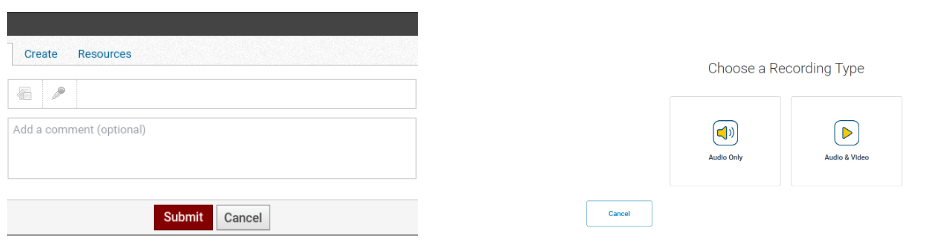
Do check your Submission Activity Comments for audio feedback from your teacher. Once the recitation has been evaluated, you will see the rubric with areas for growth, but you may also have audio feedback from your teacher in the Submission Activity Comments to the right. Don’t forget to look there for messages from your teacher. If your Schoology settings are set properly, you will be notified by email when your teacher has posted a comment for you there.
Finally, we’d like to say how happy we are to see and hear your students present their thoughts and responses in these audio/video assignments. It has made a world of difference already in our ability to identify the best way to guide each individual student toward improvement. The sense of immediacy created is remarkable.
Who reports the final semester grade for Asynchronous courses?
The instructor will report the final term's grade unless the student has an approved audit.
Final term grades for asynchronous courses are uploaded to the student’s academic record in the Kolbe Portal after the end-of-semester exam has been completed. Grades are posted during the school’s monthly grade update cycle and do not appear immediately upon exam submission. The final term's grade will include grades for all Check for Understanding (CFU) and Major Assignment (MA) assignments due during that term, which are required for credit. Any incomplete or missing CFU or MA assignments will be factored into the grade as a zero once the end-of-semester exam is submitted.
How can I ensure my student earns the "A" designation for their high school level Asynchronous course?
The student should submit all Check for Understanding (CFU) and Major Assignments (MA) each term to earn the "A" designation. For more information on our course designations, please refer to this article.
Can the instructor help me with my course selection or diploma planning?
Instructors are not meant to give diploma or transcript advice. Questions pertaining to these topics should be directed to your family advisor. Likewise, the advising staff at Kolbe Academy does not know all the inner workings and assignments given by instructors. Questions pertaining to grading and assignments should always be directed to the instructor.
Our instructors will recommend course placement for your student in the spring of every school year, allowing you to know which course to select in the next school year. Your family advisor will have access to these recommendations to assist you with course selection.
Who do I contact if I have technical issues?
Email [email protected]. All other course-related questions can be directed to the course teacher.
What if I have a question that was not answered here?
- Non-enrolled families can schedule a pre-enrollment appointment or email generic academic questions to [email protected].
- Currently enrolled families should contact their assigned family advisor.
- Questions regarding the Kolbe Portal, the enrollment process, and tuition should be emailed to [email protected].

